
Face Rig & Animation
A frontal head render goes in; soft facial masks, 2D landmarks and region scores come out. This is a head analysis tool with a live demo, not a facial animation generator.
 Head analysis
 Soft masks
 Landmarks
Runs the same analyze-head call as the worker tester.
Pipeline
Service ingests RGB plus synthetic depth (luminance) and alpha, like the pipeline tester. Output: region confidence, landmarks, contours, and soft masks for eyes, mouth, brows, etc.
Why masks
Masks show where the eyes, mouth and brows are on the head. A facial setup needs that map to keep deformation in the right regions. AutoRig returns the masks; it does not generate blendshapes and does not capture a facial performance.
In AutoRig
The V3 body rig includes the head and neck in its skeleton. The head analysis is a separate tool: it reads a frontal head render and returns masks, landmarks and region scores. The demo calls POST …/api/face-rig/analyze-head on the live worker.
Interactive demo
Sample image runs on load. Replace the image, then Run analysis to refresh masks.
Drop or click to choose image
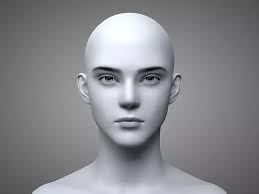
POST https://worker-0001.free3d.online/api/face-rig/analyze-head
What this tool is and is not
The tool analyzes a head image. It does not create blendshapes or morph targets, does not capture a face from video and does not drive lip sync on its own. Well-lit, centered frontal faces give the best confidence.